

I’ve been refining my Garmin R10 indoor setup on and off for the past several months. I’ve run it in a 14-foot garage, a low-ceiling basement, and a converted spare bedroom. The short answer on Garmin R10 space requirements: you need a minimum of 14 feet of room depth and 9 feet of ceiling height to get usable data indoors.
That’s the baseline. But at 54, with a full driver swing that still clips 7 feet at its apex, I needed more. Most golfers over 40 share that same need. This guide gives you the exact numbers, room-type breakdowns, and a budget-tier equipment list — before you measure wrong and order the wrong net.
Key Takeaways
- Minimum room depth: 14 ft total. That’s 6 ft behind the ball plus 8 ft from ball to net.
- Recommended room depth: 18 ft. Wider tracking distance improves data accuracy and reduces net impact force.
- Ceiling height minimum: 9 ft for irons. Taller golfers swinging a driver need 10 ft of clearance.
- R10 placement: 6 to 8 ft behind the ball. Seven feet is the sweet spot for accuracy.
- Ball to net: minimum 8 ft per Garmin’s official spec. Eleven feet or more is recommended for simulator use.
All measurements below are verified against Garmin’s official documentation and community-tested configurations. Verify current specs at garmin.com before purchasing equipment.
| Dimension | Minimum | Recommended |
|---|---|---|
| Room depth (total) | 14 ft | 18–20 ft |
| Room width | 10 ft | 12–15 ft |
| Ceiling height | 9 ft | 10 ft |
| R10 to ball distance | 6 ft | 7 ft |
| Ball to net/screen | 8 ft | 11–13 ft |

What Are the Minimum vs. Recommended Room Dimensions for the Garmin R10?
The R10 needs 14 feet of total room depth at minimum to work indoors. That covers 6 feet behind the ball for the radar and 8 feet from ball to net. Garmin officially states the ball must be at least 8 feet from the net when playing indoors.
Most golfers find 14 feet workable but tight. If you’re hitting driver with any real speed, the ball reaches the net fast and the radar has less time to lock onto flight data. Bump the room to 18 feet and accuracy improves noticeably.
Ceiling Height Requirements
Nine feet is the minimum that most golfers can work with for short irons. For a full driver swing, plan for 10 feet. At 54, my swing apex with a driver clears 7.5 feet. I would not set up in an 8.5-foot basement ceiling room and expect to swing freely.
The risk is not just embarrassment. A clipped ceiling on a full driver swing can injure your wrists and shoulders. Golfers with back issues are often told to “swing within your body” — which still gets you to 7 to 7.5 feet at the apex. Give yourself the buffer.
- 8.5 ft ceiling: Workable for short irons and putts only. A driver swing here is a real risk.
- 9 ft ceiling: Minimum safe clearance for most 5-iron through wedge swings.
- 9.5–10 ft ceiling: Comfortable for all clubs including driver for most golfers.
- 10+ ft ceiling: No restrictions. Swing freely with any club.
Room Depth Requirements
Total room depth = R10 distance behind ball + ball-to-net distance. At the minimum, that is 6 + 8 = 14 feet. But 14 feet is genuinely cramped. You are standing directly behind the device and the net is close enough to cause rebound issues with some cheaper net designs.
The recommended 18 to 20 feet gives you breathing room. The radar tracks the ball longer. The net absorbs impact more safely. And if you ever want to add a projector and impact screen, you have the throw distance to make it work.
Room Width Requirements
Ten feet of room width is the minimum. That gives you roughly 5 feet either side of the ball at address. Standard swing plane clearance without hitting walls. Wider is always better.
If your room is only 10 feet wide, set your hitting position centered to the room. A full driver swing’s arc can reach 4 to 4.5 feet from the ball at shoulder height. Left-handed golfers should be especially careful with room width on narrow setups.
How Far Behind the Ball Should You Position the Garmin R10?
Place the R10 between 6 and 8 feet behind the ball on the ground. Garmin’s official guidance confirms this range. In my own setup, 7 feet has consistently produced the tightest data. Spin rate and launch angle match what I see in Garmin Golf almost every session.
How Far Behind the Ball to Position the R10
The device sits on the ground, angled slightly toward the ball. It should be directly behind the intended ball position, not offset to the side. Radar-based launch monitors read best along the ball-flight axis.
For right-handed golfers, the R10 sits behind and slightly left of center. For left-handed golfers, mirror that position. A small misalignment at 7 feet creates a measurable data error. Take two minutes to set it up precisely every session.
Distance from Ball to Net or Screen
Garmin states the ball must travel at least 8 feet before hitting the net indoors. That is the official minimum. In practice, 10 to 13 feet gives the radar more ball-flight data and produces better spin rate accuracy.
If you are using Radar Capture Technology (RCT) balls, that 8-foot minimum works reliably. Standard balls at 8 feet give reasonable carry data but less reliable spin rate readings. Read our full Garmin R10 review for more on RCT ball performance.
How to Calculate Your Total Room Depth
- Measure R10 placement distance: 7 ft (recommended).
- Add ball-to-net distance: 11 ft (recommended) or 8 ft (minimum).
- Add 1–2 ft behind the R10 for positioning comfort.
- Total recommended: 7 + 11 + 1.5 = 19.5 ft | Total minimum: 6 + 8 + 1 = 15 ft.

Which Room Type Works Best for a Garmin R10 Indoor Setup?
The most common R10 setups fall into three room types. Each has trade-offs. Here is what actually matters for each one based on months of testing configurations.
Garage Setup (Most Common)
A two-car garage is the gold standard for R10 indoor setups. Standard dimensions run 18 to 20 feet deep and 18 to 20 feet wide, well above every recommended threshold. The concrete floor is flat and firm, which keeps the device stable.
Watch for two garage-specific issues. First, metal garage door tracks and steel studs can scatter radar signals. Keep the R10 away from metal walls. Second, temperature swings in an uninsulated garage affect device performance in winter. Check our complete R10 simulator build guide for garage insulation and lighting tips.
Pro Tip: Park your car outside before setting up. Even a parked car off to the side of the hitting area can scatter radar signals and produce erratic spin data.
Basement Setup
Basements are trickier. Most finished US basements run 7.5 to 8.5 feet from floor to ceiling, below the recommended 9-foot minimum for a full swing. If your basement ceiling is 9 feet or higher, you are in business. Below that, limit yourself to irons and partial swings.
One advantage of basements is consistent temperature year-round. Another is no weather interference. If your basement clears 9 feet, it is a comfortable year-round practice space. Measure actual clearance from floor to ceiling joists, because finished drywall can drop that number by 3 to 4 inches.
Spare Bedroom or Small Room
A spare bedroom typically runs 10 by 12 feet, right at the edge of workable. You can get a functional R10 setup in a 10 by 12 room, but you are working with minimums on every dimension. Ceiling heights in residential rooms are usually 8 to 9 feet, which works for short game practice.
This setup is best treated as a short game and putting lab. Driver work in a 10-foot wide room is possible, but the swing plane clearance is tight. See how the R10 compares to the Mevo if you want a launch monitor designed around smaller indoor spaces.
What Equipment Do You Need for a Garmin R10 Indoor Setup?
You need three things to run an R10 indoors: the launch monitor itself, a net or screen to stop the ball, and a hitting mat. Everything else is optional. Here is what to buy and what to skip.
Golf Net
A basic barrier net stops the ball and protects your walls. Budget nets in the $50 to $150 range work fine for the garmin r10 setup minimum 8-foot ball-to-net distance. If your room only allows 8 feet, buy a net with a reinforced frame. The closer the ball, the harder the impact.

- PROFESSIONAL GRADE DURABILITY – Knotless braiding technique and 3mm thick polyester cord create a heavy-duty net that wi…
- REINFORCED FOR LONG LASTING USE – Features a robust 1/4 inch rope border around the entire perimeter providing extra str…
- MULTI-SPORT PRACTICE BARRIER – Versatile 1 inch square mesh design safely catches and contains golf balls baseballs socc…
For serious indoor setups, a premium impact net or enclosure-style net gives you better durability and a cleaner look. These run $200 to $400 and hold up to consistent full-swing use at any club speed.
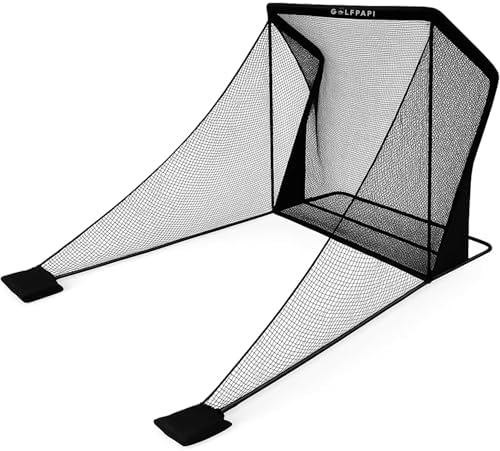
- UPDATED NEW PLY & DURABILITY – PRO-GRADE PRACTICE NET – DESIGNED FOR DAILY USE Compact 7.5 ft x 7.5 ft net engineered fo…
- COMMERCIAL-STRENGTH FRAME AND NETTING Built with a durable powder-coated steel frame and reinforced high-tension netting…
- MODERN, SPACE-SAVING DESIGN Clean satin black finish looks sharp in any setting. Ideal for use in your home, office, gar…
Hitting Mat
A quality hitting mat protects your floors and gives the R10 a consistent lie to read from. Cheap mats have uneven thickness that can shift the ball height slightly. At 54, I also need mat cushioning. Thin mats on a concrete garage floor put real stress on my lead knee after 50 swings.
Look for mats with at least 1.5 inches of total thickness and a realistic turf feel. The $80 to $150 range covers solid options. The $200-plus mats add variable-lie sections (rough, fairway, divot), worth it if you practice more than twice a week.
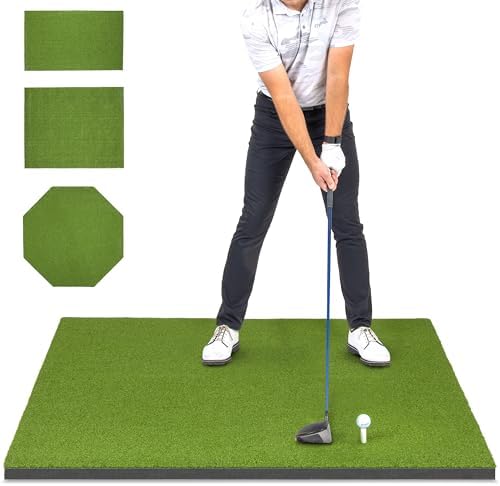
- ELITE TURF PERFORMANCE: This premium golf hitting mat features commercial-grade synthetic turf that closely replicates t…
- PREMIUM EVA FOAM: Built with EVA foam base for superior shock absorption and forgiveness, helping reduce joint strain ca…
- DESIGNED BY GOLFERS, BUILT TO LAST: Developed and tested by real golfers, this professional golf practice mat delivers l…
Optional: Impact Screen and Projector
If you want to play virtual rounds on the Garmin Golf app, you need an impact screen and projector. This adds $400 to $1,200 to your total cost. Short-throw projectors work best in rooms under 15 feet deep. Standard projectors need 12 to 15 feet of throw distance to fill a standard screen.
Plan the projector placement before you buy. A standard 9-foot-wide impact screen needs a projector mounted 7 to 10 feet back, which eats into your R10 placement area. See our full home simulator setup guide for projector-to-screen throw distance tables.

- COMMERCIAL GRADE HEAVY DUTY IMPACT SCREEN: Built to withstand high speed golf ball impacts for lasting durability; Multi…
- EASY INSTALLATION: Set up your golf simulator enclosure effortlessly with quick installation hardware and easy to read i…
- PREMIUM GOLF SIMULATOR ENCLOSURE SYSTEM: Crafted with reinforced materials and precision construction for lasting durabi…
What Are the Most Common Garmin R10 Indoor Setup Mistakes?
I made most of these mistakes myself before the setup clicked. They cost time and, in two cases, extra money. Learn from them now.
Ceiling Too Low for Driver Swings
The most common mistake: assuming your ceiling is “high enough” without measuring. Eight-foot ceilings feel spacious for everyday life. They fall short of the room size you need for a full driver swing. Measure from floor to the lowest obstacle — ceiling fan, light fixture, exposed beam — before you swing anything.
Misaligned Radar Unit
The R10 must face directly toward the ball-to-target line. Even a few degrees of horizontal misalignment skews club path and face angle data. Set the device up with a yardstick or tape measure along the ball line, not by eye.
Vertical alignment matters too. The front face of the R10 should be perpendicular to the floor, not tilted back or forward. Garmin’s app shows a placement guide that helps. Use it every session, not just the first one.
Metal Objects Causing Interference
Metal shelving, steel garage door tracks, and parked cars scatter radar signals. Set up the R10 away from metal surfaces. In a typical garage, keep at least 3 feet of clearance between the device and any large metal object.
Not Planning for Projector Throw Distance
If you want a simulator screen later, plan that throw distance now. Many golfers buy a net, build the setup, and then discover the projector needs to sit in the middle of the swing zone. Map out all your equipment positions before you bolt anything to the floor or walls.
What Does a Garmin R10 Simulator Setup Cost by Budget Tier?
Here are three realistic indoor configurations. Each builds on the last. Prices reflect current Amazon availability. See our launch monitor under $700 guide if you are still comparing devices before buying an R10.
Budget Setup: Net + Mat Only (~$130–$250)
| Item | Estimated Cost |
|---|---|
| Garmin Approach R10 | ~$499 |
| Basic barrier golf net | $50–$150 |
| Entry-level hitting mat | $80–$120 |
| Total (excl. device) | $130–$270 |
This is a pure practice data setup. You get full ball and club data from the R10. No virtual golf, no projected course. Just raw numbers on your phone. Perfect for a 10-foot basement with a 9-foot ceiling.
Mid-Range Garage Simulator (~$800–$1,400)
| Item | Estimated Cost |
|---|---|
| Garmin Approach R10 | ~$499 |
| Premium impact net/enclosure | $200–$400 |
| Quality hitting mat | $150–$250 |
| Budget short-throw projector | $300–$500 |
| Total (excl. device) | $650–$1,150 |
This is what most serious golfers over 40 build for winter practice. You get virtual rounds on Garmin Golf app with a screen to see the simulation. You need at least 16 feet of room depth and 10 feet of ceiling height for a comfortable projector throw.
Premium Enclosure Setup (~$2,000–$4,000+)
Full enclosure bays with a dedicated impact screen, side netting, an elevated projector mount, and quality hitting strip go from $2,000 to $4,000 before you count the R10. This is a dedicated room build. See our portable launch monitor guide if budget is your first constraint and the R10 might be overkill for your goals.
Frequently Asked Questions
How much room do I need for a Garmin R10?
You need a minimum of 14 feet of total room depth: 6 feet behind the ball for the R10 and 8 feet from ball to net. A 10-foot width and 9-foot ceiling complete the minimum setup. Garmin recommends more space where possible for better tracking accuracy.
Can the Garmin R10 be used indoors?
Yes. The Garmin R10 is designed for both indoor and outdoor use. Indoor setup requires specific spacing for the radar to function accurately. The official minimum is 8 feet from ball to net and 6 to 8 feet behind the ball for device placement.
What ceiling height is needed for a Garmin R10 indoor setup?
Garmin requires at least 9 feet of ceiling height for most golfers using a full swing. Taller golfers or those with high-swing-plane driver swings should have 10 feet. A ceiling under 9 feet limits you to partial swings and short irons.
How far should the R10 sit behind the ball?
Place the R10 between 6 and 8 feet behind the ball on the ground, aimed directly at the ball-to-target line. Seven feet is the recommended distance for the best accuracy balance between radar lock and flight tracking distance.
How far does the ball need to travel before hitting the net?
Garmin’s official indoor specification requires the ball to travel at least 8 feet before hitting the net. Eleven feet or more produces noticeably better spin rate data. Using RCT balls improves accuracy even at the 8-foot minimum.
Set Up the R10 Right the First Time
Measure your room before you buy a single piece of equipment. Ceiling height and total room depth are the two numbers that determine what setup is actually possible for you. Get those right and everything else follows.
If you are still deciding on the device itself, read our full R10 review: it covers data accuracy, app experience, and real-world performance for golfers over 40. If you are ready to go bigger, our complete simulator build guide takes you from bare room to playing virtual rounds.
Check the current R10 price below before you plan your budget:
[aawp box=”ASIN_GARMIN_R10″ template=”horizontal”]
