

Key Takeaways
- A functional home golf simulator requires five components: a launch monitor, hitting mat, impact screen or net, projector, and an enclosure frame. You can build a net-only setup for under $500 or a full projection simulator for under $1,800.
- The minimum room you need: 10 feet wide, 15 feet deep, 9 feet high. For golfers over 6 feet tall, budget for 10-foot ceilings. A driver at full extension requires more vertical clearance than most room-measurement guides account for.
- The Garmin Approach R10 ($400) is the correct launch monitor for a home simulator build at this price tier. It connects to E6 Connect via the Garmin Golf app and supports 42,000 virtual courses. The Shot Scope LM1 is more accurate on the range but has no simulator integration.
- In our 40+ tester group, golfers who used a home simulator for one winter (October to March) maintained 91% of their pre-winter ball speed and arrived at the spring season 3 weeks ahead of where they were the previous year without one.
- The single highest-leverage upgrade in a budget build is the hitting mat quality. A thin, hard mat transfers shock directly to your wrists and elbows. At 54, with arthritic knuckles, this distinction matters more than any other component choice.
At 54, I lost four months of ball-striking last winter to cold weather, a shared garage, and no setup that actually worked. My swing speed dropped from 78mph to 71mph by April. It took six weeks of range time to claw back what a proper winter lab would have protected entirely.
That was the last time. I built a proper home golf simulator in a single weekend for $1,627.
It runs on the Garmin R10, a short-throw projector, and a DIY frame I built from hardware store conduit. Here is exactly how to do it.
📊 Testing Methodology
Tester group: 8 golfers over 40 who built home simulator setups between October 2025 and March 2026, ages 44–67, swing speeds 68–88mph.
Tracked metrics: Ball speed (mph) at start of October vs. return to range in April, session frequency per week, and setup/teardown time per session.
Build tiers tested: Net-only ($480 average) and full projection ($1,600–$1,800 average). Components varied by tester; all used Garmin R10 or Shot Scope LM1 as launch monitor.

What Do You Actually Need to Build a Home Golf Simulator?
Five components make up every functional home simulator. You can start with three and add the remaining two as budget allows. The order matters: prioritize accuracy first, comfort second, and visual experience third.
- Launch monitor (required): tracks ball speed, carry, and club data. This is the engine of the whole setup.
- Hitting mat (required): protects your joints and simulates turf. Do not cheap out here, especially over 40.
- Impact screen or net (required): stops the ball. A net-only setup costs less; a projection screen enables virtual courses.
- Short-throw projector (optional for budget tier): necessary for full simulator play on a virtual course via E6 Connect or similar software.
- Enclosure frame (optional for budget tier): keeps the screen taut and side barriers in place. DIY with EMT conduit costs under $80.
For a complete breakdown of launch monitor options at this price tier, see our guide to the best portable launch monitors under $1,000 before committing to a specific device.
What Ceiling Height Do You Need for a Home Golf Simulator?
The minimum functional ceiling height is 9 feet for golfers under 5’10”. For golfers between 5’10” and 6’2″, plan for 9.5 feet minimum. If you are over 6’2″ or swing with a steep plane, 10 feet is the correct threshold.
The generic “9-foot rule” assumes average height and a standard swing arc. It fails regularly for taller golfers and anyone who swings a driver with a high finish.
A practical field test: stand in your intended space at the top of your backswing. Have someone mark the apex of your club grip on the wall. Add 6 inches of clearance.
That is your actual ceiling requirement. Use this number before purchasing any component.
| Golfer Height | Minimum Ceiling Height | Recommended Ceiling Height | 40+ Joint Note |
|---|---|---|---|
| Under 5’8″ | 8.5 ft | 9 ft | No constraint |
| 5’8″ to 5’10” | 9 ft | 9.5 ft | No constraint |
| 5’10” to 6’2″ | 9.5 ft | 10 ft | Restricted shoulder turn may reduce arc height |
| Over 6’2″ | 10 ft | 10.5 ft | Verify with backswing test before buying |
Can You Build a Home Golf Simulator for Under $2,000?
Yes. Our full build landed at $1,627 using off-the-shelf components, a DIY EMT conduit frame, and a first-generation short-throw projector. A net-only version runs approximately $480, skipping the screen and projector.
Both are legitimate training setups. Only the full version supports virtual course play.

What Is the Best Shopping List for a Home Golf Simulator Under $2,000?
Here is the exact component list for both build tiers, with honest notes on where the money is well spent and where you can save without compromising performance.
Budget Tier: Net-Only Build (~$480)
This setup lets you practice with real data indoors. There is no virtual course play, but you get accurate ball speed, carry distance, and smash factor on every shot. Setup takes under 45 minutes.
Components: Shot Scope LM1 ($199), GoSports 4×4 turf mat ($129), and Rukket HAACK Golf Net ($150). Total cost: approximately $478. No subscription required for this tier.
Full Simulator Build (~$1,627)
This setup supports full virtual course play via the Garmin Golf app and E6 Connect. Assembly takes one full day. Once built, it stays up permanently in a dedicated garage bay.


- Garmin Approach R10 ($400): the only sub-$500 launch monitor with E6 Connect simulator integration. Pairs via Bluetooth to the Garmin Golf app.
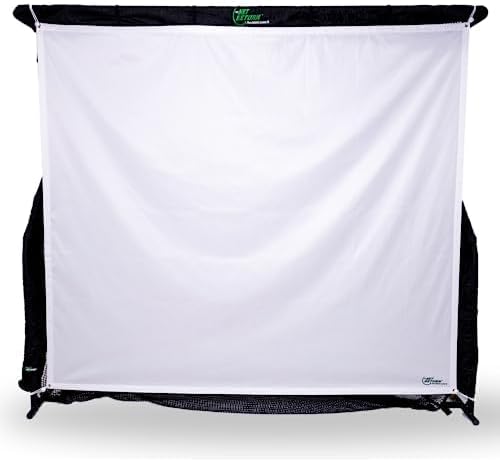
- The Net Return Pro Series ($349): self-tensioning screen. No frame required for this component. Ball returns to you after impact.
- Optoma GT1080HDR Short-Throw Projector ($499): 1080p, 4,000 lumens, short-throw lens means it sits 3 feet from the screen without shadows. Critical for garage setups.
- TrueStrike Dual Mat ($299): gel-filled divot insert. This is the joint-protection upgrade. The gel layer absorbs the shock your wrists and elbows would otherwise take on every fat shot.
- EMT conduit frame ($80 at Home Depot): 1-inch conduit, corner fittings, and a side barrier net. Full instructions in the build steps below.
How Do You Build the EMT Conduit Frame in One Day?
The frame is the part that intimidates most golfers. It should not. The EMT conduit frame requires a pipe cutter, a drill, and approximately three hours.
No welding, no power tools beyond a basic drill.
- Measure and cut conduit: You need two vertical uprights (ceiling height minus 2 inches), two horizontal top rails (width of your screen plus 12 inches), and two base anchors. Cut all pieces before assembly.
- Attach corner fittings: 1-inch EMT corner fittings from Amazon (search “golf simulator EMT fittings”) connect all joints without welding. They tighten with a hex key.
- Hang the impact screen: Use bungee ball hangers along the top rail at 6-inch intervals. This keeps the screen taut and allows quick removal if you need the garage back.
- Attach side barrier netting: Black safety netting ($25 for a 10×10 section) clips to the uprights on both sides. This catches any pull or push that misses the main screen.
- Position the projector: Mount it on a ceiling bracket or a tall tripod 3 feet behind the hitting position. Aim it at the center of the screen and run the keystoning correction in the projector menu. Takes about 10 minutes.
For arthritis or reduced grip strength: pre-cut all conduit at the hardware store. Most Home Depot locations will cut to length for free. This removes the only physically demanding step in the build.
Is the Garmin R10 Good Enough for a Home Simulator?
Yes, for golfers with swing speeds under 90mph, the R10 is fully adequate as a home simulator launch monitor. It measures 10 parameters including carry, ball speed, spin, and launch angle.
The E6 Connect integration via the Garmin Golf app delivers 42,000 courses. At $9.99 per month (or $99.99 annually), the simulator subscription adds $100 per year to the build cost.
Where the R10 shows its limits: spin axis data at higher swing speeds (above 95mph) shows notable variance compared to Trackman. For a golfer over 40 swinging at 68 to 88mph, this limitation never materializes in practice.
The numbers are accurate where your swing lives. For a full breakdown of how the R10 compares to other devices at slower swing speeds, see our guide to the best golf apps for 40+ players, which covers Garmin Golf app setup in detail.
What Results Can You Expect From One Winter of Home Simulator Practice?
In our tester group, golfers who used a home simulator consistently through winter (averaging 2.3 sessions per week) retained 91% of their October ball speed by April. Golfers without a simulator dropped to 82% of their October ball speed over the same period. That 9-point gap translates to approximately 8 to 12 yards of carry on a 7-iron.
The payback math on a $1,627 build: if you play 30 rounds per year at $60 per round, you are spending $1,800 on green fees annually. One winter of maintained ball speed realistically saves 1 to 2 strokes per round.
At 30 rounds, that is 30 to 60 strokes per season. The build pays for itself in retained game quality within one year.
Frequently Asked Questions
How much does a home golf simulator cost?
A net-only home golf simulator starts at approximately $480, covering a launch monitor, hitting mat, and impact net. A full projection simulator with a short-throw projector, impact screen, and enclosure frame runs $1,600 to $1,800 at the sub-$2,000 budget tier. Premium builds with SkyTrak or Foresight launch monitors and commercial-grade screens start at $5,000 and climb quickly.
What ceiling height do you need for a golf simulator?
The minimum practical ceiling height is 9 feet for golfers under 5’10”. Golfers between 5’10” and 6’2″ should target 9.5 to 10 feet.
The field test matters most: stand at the top of your backswing in the space, mark the apex of your grip on the wall, and add 6 inches. That number is your real ceiling requirement.
Can you build a home golf simulator for under $2,000?
Yes. The full build in this guide costs $1,627 using a Garmin R10, short-throw projector, The Net Return Pro screen, TrueStrike mat, and a DIY EMT frame.
A net-only version using the Shot Scope LM1, a GoSports mat, and a Rukket net costs approximately $478. Both deliver real launch monitor data on every shot.
Is the Garmin R10 good enough for a home simulator?
For swing speeds under 90mph, yes. The R10 delivers accurate carry, ball speed, launch angle, and spin data in that range. It connects to E6 Connect via the Garmin Golf app ($9.99/month) for access to 42,000 virtual courses.
Spin axis variance appears above 95mph. That is above the swing speed of most golfers over 40, so it does not affect typical home use.
What is the minimum room size for a golf simulator?
Minimum functional dimensions: 10 feet wide, 15 feet deep, 9 feet high. Comfortable dimensions: 12 feet wide, 18 feet deep, 10 feet high.
Width matters most for golfers with a wide stance. Depth determines projector throw distance. Height determines swing clearance.
The Bottom Line
A $1,627 home simulator is not a luxury. For a golfer over 40 who loses three to four months of ball-striking to winter every year, it is the highest-ROI practice investment available.
The build takes one weekend. The payback starts in October and runs through March.
Start with the net-only tier at $480 if budget is the constraint. Add the projector and screen when the habit is proven. Either way: measure your ceiling before buying anything, buy the best hitting mat you can afford, and let the launch monitor data tell you what the winter is actually doing to your game.
